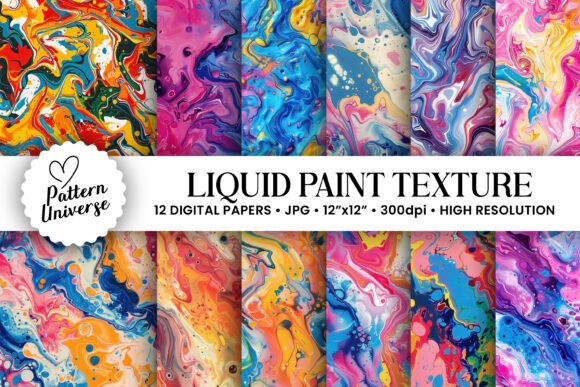
Liquid Paint Texture Seamless Patterns: A Versatile Tool for Creative Projects
Seamless patterns are a staple in the creative world, offering designers and hobbyists alike a way to add depth, interest, and visual cohesion to their projects. Among the many types of seamless textures available, Liquid Paint Texture Seamless Patterns stand out for their organic feel and adaptability. These digital designs mimic the fluidity and randomness of real paint strokes, making them ideal for adding an artistic touch to a wide range of applications—from gift wrapping to greeting cards, invitations, tumbler wraps, junk journal backgrounds, wall art, and more.
Understanding Liquid Paint Texture Seamless Patterns
A liquid paint texture seamless pattern is a digitally created image that simulates the look of wet or flowing paint. Unlike static images, these patterns are designed to repeat seamlessly, allowing them to be scaled and tiled without visible seams or disruptions. The result is a natural, painterly background that can be applied across various surfaces and media.
This type of texture is particularly useful when you want to introduce a sense of movement or softness into your design. Whether you're creating something elegant or whimsical, liquid paint textures provide a base that feels both professional and handcrafted. They’re commonly used in scrapbooking, card-making, stationery design, and even web graphics where subtle background elements enhance the overall aesthetic.
Why Choose AI-Generated Liquid Paint Textures?
AI-generated seamless patterns offer a unique blend of creativity and efficiency. Artists and designers can leverage machine learning algorithms to produce textures that maintain the authenticity of traditional painting techniques while ensuring precision and consistency. These files are often high-resolution (300dpi), sized at 3600 x 3600 pixels or 12" x 12", which makes them suitable for print and digital use alike.
The advantage of AI generation lies in its ability to create multiple variations quickly. When you purchase a set like the 12 Liquid Paint Texture Seamless Patterns, you gain access to a curated collection that provides diversity without requiring manual effort. This is especially valuable for creators who work on tight deadlines or need consistent visual elements across multiple projects.
Integration Into Common Craft and Design Workflows
Whether you're a seasoned designer or a casual crafter, knowing how to integrate liquid paint texture seamless patterns into your workflow can significantly enhance your output. Here’s how they fit into different stages and applications:
Pre-Project Preparation
- Theme Development: Use liquid paint textures during the brainstorming phase to visualize the mood or style of a project. Their soft, flowing nature works well for romantic, vintage, or abstract themes.
- Asset Curation: Include these textures in your digital library alongside brushes, fonts, and clip art. Organize them by color, contrast, or complexity to streamline future selections.
- Mockup Testing: Apply the textures to sample mockups before finalizing your design. This helps ensure compatibility with other elements and confirms the desired visual effect.
During Project Execution
- Layering Technique: Import the pattern as a background layer in software like Photoshop or Procreate. Adjust the opacity to let underlying content shine through while adding depth.
- Color Matching: Since the patterns are provided in neutral tones, consider using blending modes such as Multiply or Overlay to tint them according to your project's color scheme.
- Texture Enhancement: Combine the paint texture with other effects like noise layers or grunge overlays to build more complex, multidimensional designs.
Post-Production and Final Touches
After completing the main layout, apply a liquid paint texture as a finishing detail. It can soften sharp edges, unify disparate elements, or give a tactile quality to digital prints. For example, in greeting card design, placing a textured overlay behind text can make it feel handwritten or aged, depending on the pattern chosen.
Use Cases Across Creative Industries
The versatility of liquid paint texture seamless patterns means they can be adapted to suit nearly any creative endeavor. Let’s explore some specific use cases and how these textures support each one:
Gift Wrapping and Packaging
When designing custom gift wrap or product packaging, a liquid paint texture adds a handmade flair that sets your work apart from generic templates. Print the pattern on high-quality paper or transfer it digitally onto e-commerce packaging mockups for a cohesive brand identity.
Greeting Cards and Invitations
These patterns are excellent for creating unique, personalized greeting cards or event invitations. They can serve as a background for handwritten notes or printed messages, giving the impression of elegance and authenticity. Pair them with calligraphy or vintage-style fonts for a refined look.
Tumbler Wraps and Merchandise
Merchandising items like tumblers, mugs, or T-shirts requires attention to scale and resolution. The included 12" x 12" size ensures that the texture looks crisp and detailed when printed. Use them to highlight key graphic areas or as a subtle underlayer to suggest brushstrokes or watercolor washes.
Junk Journal Backgrounds
Junk journals thrive on eclectic, layered aesthetics. By incorporating a liquid paint texture, you can simulate the appearance of aged or painted paper. These textures work especially well when combined with collage elements, pressed flowers, or ink drawings, helping to unify the composition visually.
Wall Art and Decor
For wall art or decorative prints, the texture serves as a foundational element. You can use it as a canvas for digital paintings or as a standalone piece with minimal design. The high-resolution format supports large-scale printing, ensuring clarity and richness even when viewed up close.
Scrapbook Pages and Layouts
Scrapbookers appreciate the ability to personalize pages with unique textures. A liquid paint texture can act as a background for photos or journaling, offering a soft, artistic backdrop. Consider adjusting the saturation or brightness to match the tone of the memories being shared.
Workflow Tips for Using These Patterns
To get the most out of your 12 Liquid Paint Texture Seamless Patterns, here are a few practical tips for integrating them into your process:
- Organize Your Files: Extract the zip file and sort the patterns based on their intensity or color tone. This saves time when selecting the right texture for a specific project.
- Experiment with Blending Modes: In photo editing software, try using Soft Light, Overlay, or Color Burn to see how the texture interacts with your base design. Each mode offers a different effect.
- Combine with Other Assets: Don’t limit yourself to just one texture per project. Layer two or more to create a more dynamic surface. Just be sure to adjust transparency levels to avoid overwhelming the viewer.
- Test Before Printing: Always do a test print if you plan to use the texture in physical form. Check for graininess or pixelation, especially if scaling up the image.
Software Compatibility and Workflow Integration
Most of these textures will work well with popular design platforms like Adobe Photoshop, Illustrator, Canva, and Procreate. For web-based tools, ensure the file format (typically PNG or JPEG) is supported. If working with vector assets, place the texture beneath your design to maintain scalability without loss of quality.
Additionally, consider how the texture might interact with lighting or shadows in your design. A dark, heavy texture may overpower delicate illustrations, while a light, translucent one could subtly enhance them. Knowing this upfront allows you to plan accordingly and avoid unnecessary revisions.
Long-Term Use and Quality Control
One of the strengths of AI-generated seamless patterns is their consistency. Once you've selected a preferred texture, you can confidently reuse it across multiple projects without worrying about mismatched visuals. This is crucial for maintaining brand identity or personal style in ongoing work.
To keep your files organized for long-term use, consider naming each texture based on its dominant feature—such as “Liquid_Texture_Light_Blue” or “Paint_Wash_Golden.” This system helps you locate the right pattern quickly when inspiration strikes.
Also, store the original high-resolution files separately from edited versions. This preserves quality for future use and allows for easy adjustments when repurposing the texture for new projects.
Efficiency Through Reuse
Think of these textures as part of your design toolkit. Instead of starting from scratch every time you need a background, simply pull one from your library and customize it. Over time, this builds a streamlined workflow that lets you focus more on the creative aspects and less on repetitive tasks.
Getting Started: A Sample Workflow Example
Let’s walk through a quick example of how these textures can be implemented in a greeting card project:
- Open your design software and create a new document in the size of your card (e.g., 5" x 7").
- Import one of the 12 Liquid Paint Texture Seamless Patterns as the background layer.
- Adjust the opacity to around 40% so the texture complements rather than competes with your message or imagery.
- Add your main content (text, photos, etc.) and experiment with blending modes to see how the texture enhances the overall design.
- Export the final design in high resolution for print or digital sharing.
This approach not only saves time but also ensures a polished outcome that aligns with your creative vision.
Final Thoughts on Practical Application
Liquid Paint Texture Seamless Patterns are more than just decorative—they’re functional assets that contribute to the professionalism and uniqueness of your work. By understanding how they behave in different contexts and planning their use in advance, you can elevate your projects while maintaining efficiency.
As with any design tool, the key is experimentation and adaptation. These textures are flexible enough to suit minimalist layouts or bold, expressive compositions. The goal is to use them as part of a broader strategy, enhancing your workflow without complicating it.
If you're looking to expand your creative resources, the 12 Liquid Paint Texture Seamless Patterns offer a convenient and high-quality solution. With thoughtful integration, they can become a go-to element in your design process, supporting both individual creativity and professional consistency.